
My Passwords Manager
In-app purchases
4.5star
43.6K reviewsinfo
1M+
Downloads

PEGI 3
info






About this app
Struggling to remember complex passwords for dozens of accounts? Tired of password reset emails? My Passwords Manager is the secure and private solution you need. Download now and experience the peace of mind that comes with having all your passwords organized and protected.
My Passwords Manager safeguards your logins, passwords, and other sensitive information in a highly encrypted vault, accessible only with your master password. No internet access required, ensuring your data stays private and offline.
Unlike cloud-based managers, your data never leaves your device, ensuring strong security with no internet access.
Key Features
• AES-256 encryption – The gold standard for data security
• Quick & easy access – Simplify login management
• Offline & private – No internet permission required
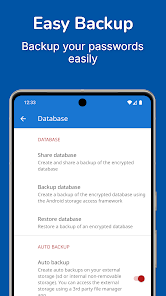
• Backup & restore – Securely transfer data between devices
• Built-in password generator – Create strong passwords instantly
• Auto exit – Locks when the screen turns off
• Multi-window support – Boost productivity
• Unlimited entries – Store all your logins with ease
PRO Features (One-time purchase, no subscriptions)
• Biometric unlock – Fingerprint & face authentication
• Password history – Track previous passwords
• Self-destruction – Extra security in case of attacks
• Custom fields – Store additional details for each entry
• Clipboard auto-clear – Prevent leaks
• CSV import & export – Seamless migration and backup
• PDF export & print – Save and print your passwords securely
• Image attachments – Store visual credentials
• Wear OS support – Access passwords on your smartwatch
• Theme Selection – Personalize your app experience with various themes
• Unlimited Labels & Mass Actions – Organize your way
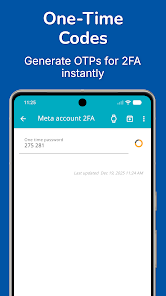
• One-Time Passwords (OTP) – Built-in authenticator for 2FA accounts
Why Go PRO?
Enjoy all the premium features with a single in-app purchase. No subscriptions, no recurring fees.
Security You Can Trust
Your data is protected with AES-256 encryption, a widely trusted industry standard. Need a strong password? Generate one instantly with the built-in tool.
Backup & Restore
Easily transfer your data across devices using local storage or apps like Dropbox and Google Drive. Just create a backup and restore it using your master password.
Wear OS Integration
Store selected passwords on your smartwatch for quick access. Just open an entry on your phone and tap the watch icon. View selected OTP codes directly on your smartwatch for quick access.
Important Notes
• My Passwords Manager is an offline password manager. Data is not automatically synced between devices.
• Lost Master Password? Your data cannot be recovered. Please choose and remember your master password carefully.
My Passwords Manager safeguards your logins, passwords, and other sensitive information in a highly encrypted vault, accessible only with your master password. No internet access required, ensuring your data stays private and offline.
Unlike cloud-based managers, your data never leaves your device, ensuring strong security with no internet access.
Key Features
• AES-256 encryption – The gold standard for data security
• Quick & easy access – Simplify login management
• Offline & private – No internet permission required
• Backup & restore – Securely transfer data between devices
• Built-in password generator – Create strong passwords instantly
• Auto exit – Locks when the screen turns off
• Multi-window support – Boost productivity
• Unlimited entries – Store all your logins with ease
PRO Features (One-time purchase, no subscriptions)
• Biometric unlock – Fingerprint & face authentication
• Password history – Track previous passwords
• Self-destruction – Extra security in case of attacks
• Custom fields – Store additional details for each entry
• Clipboard auto-clear – Prevent leaks
• CSV import & export – Seamless migration and backup
• PDF export & print – Save and print your passwords securely
• Image attachments – Store visual credentials
• Wear OS support – Access passwords on your smartwatch
• Theme Selection – Personalize your app experience with various themes
• Unlimited Labels & Mass Actions – Organize your way
• One-Time Passwords (OTP) – Built-in authenticator for 2FA accounts
Why Go PRO?
Enjoy all the premium features with a single in-app purchase. No subscriptions, no recurring fees.
Security You Can Trust
Your data is protected with AES-256 encryption, a widely trusted industry standard. Need a strong password? Generate one instantly with the built-in tool.
Backup & Restore
Easily transfer your data across devices using local storage or apps like Dropbox and Google Drive. Just create a backup and restore it using your master password.
Wear OS Integration
Store selected passwords on your smartwatch for quick access. Just open an entry on your phone and tap the watch icon. View selected OTP codes directly on your smartwatch for quick access.
Important Notes
• My Passwords Manager is an offline password manager. Data is not automatically synced between devices.
• Lost Master Password? Your data cannot be recovered. Please choose and remember your master password carefully.
Updated on
Safety starts with understanding how developers collect and share your data. Data privacy and security practices may vary based on your use, region, and age. The developer provided this information and may update it over time.

No data shared with third parties
Learn more about how developers declare sharing

No data collected
Learn more about how developers declare collection
Ratings and reviews
4.5
41.8K reviews

Paul Sandoval
- Flag inappropriate
January 22, 2026
OK, I'm going to say I really enjoyed this app so far and it is easy to use. I did found one fatal flaw and it's the fact that if you want to edit an entry and any of it's fields, the drop down window brings up "edit" and "delete". Delete is very close to edit and you can accidentally fat-finger it when you meant to hit edit. This probably wouldn't be a problem if this app implemented a fail-safe pop up dialog that says "Are your sure?". Sure you can backup databases but this is still a bother.
7 people found this review helpful
Erkan Molla
January 22, 2026
Thank you for the detailed feedback and kind words about the app. You’re absolutely right—accidental taps can happen, and a confirmation dialog for deletions is a very reasonable suggestion. We appreciate you pointing this out and will take it into consideration to improve usability and prevent unintended deletions.

Donna Myers
- Flag inappropriate
- Show review history
January 10, 2026
I really like this app. It has many pre-filled category/titles from which to choose. I currently have the free version; you probably get more spiffs for the $8.99 upgrade. I do have one suggestion for the developers: could you make the app secure with a PIN rather than a password? Or perhaps make the choice available? Thank you. One more thing: this app is easily transferred to your new phone: no glitches, no sync no lost data. Woo Hoo!!
142 people found this review helpful
Erkan Molla
January 10, 2026
Thank you so much for the great review and thoughtful suggestions! You can already use a numeric-only master password by using to the keypad icon on the login screen, and in the PRO version you can also enable biometric unlock for quick access.

Geoff Dyer
- Flag inappropriate
December 29, 2025
I have the free version & haven't used the App for some time. What i thought was the master password doesn't work & i can't reset the password to start using the App again. I have uninstalled & re-installed but the App still wants the master password. Android phone.
5 people found this review helpful
Erkan Molla
January 2, 2026
If the app is still asking for the old master password after reinstalling, it usually means Android restored the app data automatically. Please try clearing the application data in System Settings. If you need help with the steps, please contact us and we’ll gladly assist.
What’s new
- Support OTP
If you have any questions please contact: android@my-passwords-app.com
If you have any questions please contact: android@my-passwords-app.com
App support
About the developer
FATME ROUSTEM
android@my-passwords-app.com
30 KLEMANSO
XANTHI 67100
Greece


